




Seedance 2.5 vs Veo 3.1 in Education: Which Workflow Fits Guided Visual Lessons Better?
A geography teacher already has an approved map, several diagrams, and one learning…
A geography teacher already has an approved map, several diagrams, and one learning objective: help students recognize the major physical features of Africa before they begin a map exercise.
The question is not which AI video model produces the most impressive clip. It is which workflow can help turn those verified materials into a useful guided explanation without compromising accuracy.
For geography lessons, that distinction matters. Maps and labels carry facts. Motion, narration, and pacing help explain them.
The two should not be confused.
Start With What Students Need to Learn
Suppose students need to identify the approximate locations of the Atlas Mountains, Sahara, Nile, Congo Basin, and major surrounding bodies of water.
The teacher already has verified instructional material. An AI model should not decide where those features belong.
A short lesson might introduce the continent, focus on North Africa, move toward major river systems, and finish with a recall activity.
Only after that sequence is clear does video generation become useful.
The facts define the lesson. AI can help test how those facts are presented.
When the Lesson Already Has Maps and References
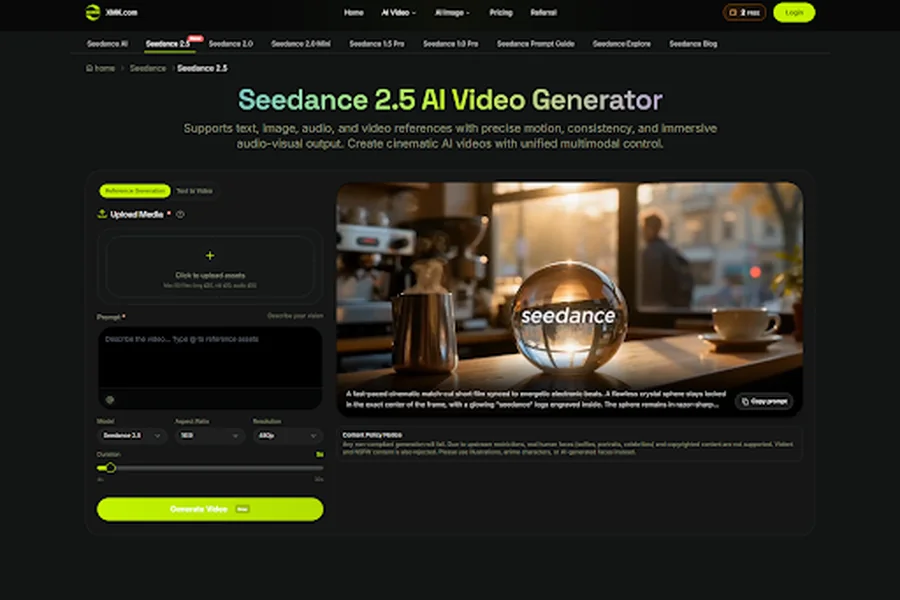
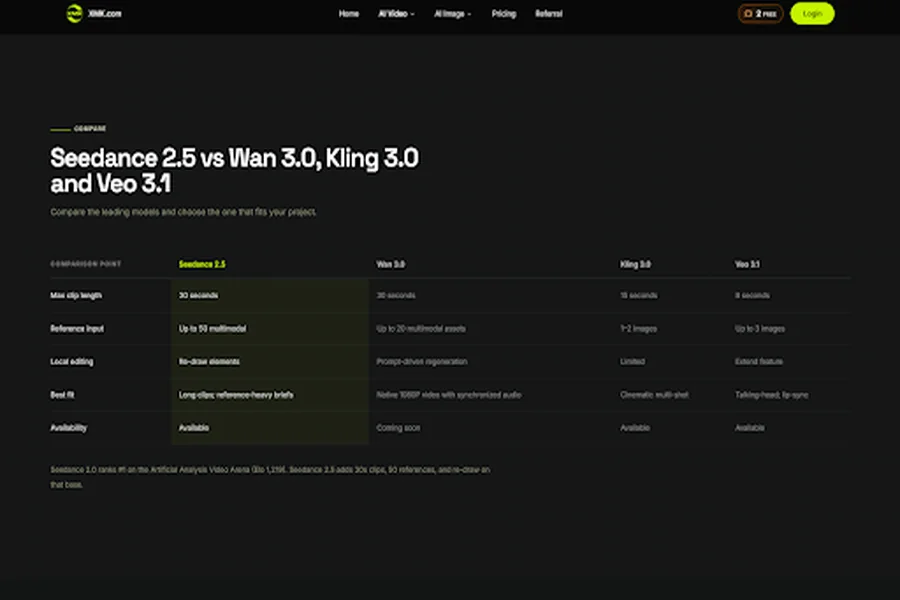
XMK positions seedance 2.5 ai around a multimodal workflow using text, image, video, and audio references. Its current product page also describes generation of up to 30 seconds in one pass.
That can be useful when a teacher already has several approved materials: a map, original diagrams, illustrations, an audio reference, and a planned sequence.
Instead of asking the model to invent a geography lesson, the teacher can use those materials to test pacing and supporting visuals.
A longer draft may help answer practical questions. Is there enough time to introduce the region? Does the map stay visible long enough? Can the lesson explain two or three features and still leave room for a recap?
Those questions are more useful than asking whether the video looks cinematic.
When Sound Is Part of the Lesson
Another lesson may depend more heavily on sound.
Google describes Veo 3.1 as supporting native audio alongside video, including sound effects, ambience, and dialogue. Its Ingredients to Video workflow supports reference-guided generation, while Scene Extension can continue an existing shot.
This can suit compact lesson scenes where the teacher wants to test how sound and visuals work together.
Neither workflow should be reduced to “references versus audio.” Seedance 2.5 also accepts audio references, while Veo 3.1 also supports reference-guided creation.
The difference is emphasis. Seedance 2.5 can suit a lesson built around a larger collection of existing references and a longer guided draft. Veo 3.1 offers another approach when generated audio is an important part of a compact scene.
Generated dialogue should not automatically become the final teaching narration. Google also notes that natural and consistent spoken audio, particularly in shorter speech segments, remains an area of active development.
For lessons, an approved script recorded or synthesized through a dedicated, reviewed narration workflow may be safer than relying on dialogue generated inside the video.
Whatever narration method is used, pronunciation, place names, dates, and geographic terminology should be checked against the approved lesson script.
Maps Need a Different Standard
For geography education, a map is not just another image.
A generated map may distort borders, move labels, change coastlines, misplace rivers, or introduce plausible-looking text that is simply wrong.
Even when a verified map is supplied as a reference, the generated reproduction should not be assumed to remain geographically exact.
When location matters, use the original verified map.
| Lesson element | Use |
| Borders and locations | Verified map |
| Rivers and physical features | Verified geographic source |
| Labels and place names | Approved lesson material |
| AI-generated visuals | Supporting context only |
Generated motion, scenery, or transitions can support the explanation. Verified maps, labels, arrows, and place names should be added from authoritative material when accuracy matters.
The Seedance 2.5 AI Video Generator also describes local re-draw. This may help adjust a non-factual illustration or background, but verified maps, labels, dates, and diagrams should come from authoritative sources rather than being corrected through generative editing.
Choose the Workflow Around the Teaching Question
Once the factual boundary is clear, the comparison becomes simpler.
| Lesson need | What matters | Workflow |
| Longer guided explanation using several existing references | Reference continuity and pacing | Seedance 2.5 |
| Compact scene where generated audio or draft narration is part of the test | Audio-visual development | Veo 3.1 |
| Exact borders, labels, locations, or geographic facts | Factual accuracy | Use verified sources, not either model |
The third row is important.
Sometimes the right answer is not another AI generation.
If students need to learn the exact location of a capital or the correct course of a river, an authoritative map is more useful than a visually impressive generated scene.
Sometimes a Pause Teaches More Than Another Animation
Educational pacing is different from advertising pacing.
If a map appears for two seconds while narration introduces five locations, students have little opportunity to connect the words with the geography.
A teacher should be able to pause on a region, let students read a label, and give them time to process one idea before introducing the next.
Sometimes a pause teaches more than another animation.
Final lessons should also be checked for accurate captions, readable labels and contrast, clear narration, sufficient reading time, and an accessible transcript or equivalent text where appropriate.
Video Should Lead Back to Practice
Watching a location appear is not the same as remembering where it is.
After a guided explanation, students still need to retrieve the information themselves.
They might identify countries on a blank map, locate rivers, match capitals to countries, or complete an interactive map quiz.
This is where interactive map practice becomes useful. A map activity can move learners from passive viewing to active recall: identify a location, receive feedback, correct a mistake, and try again.
The video can prepare the learner.
The activity shows whether the learner actually remembers.
A Simple Lesson Workflow
A teacher does not need a complicated production pipeline.
- Define — Set one clear learning objective.
- Verify — Prepare accurate maps, facts, labels, and references.
- Prototype — Test the sequence, pacing, sound, and supporting visuals.
- Review — Use verified originals for factual elements and check narration and accessibility.
- Practice — Follow the explanation with a map activity, quiz, discussion, or recall exercise.
The video is one part of the lesson, not the lesson itself.
Choose the Workflow, Then Return to the Map
Seedance 2.5 may suit a lesson built around several existing image, video, or audio references and a longer guided draft. Veo 3.1 may suit a compact scene where generated audio is part of what the teacher wants to explore.
But neither model should become the source of geographic truth.
Use verified maps for the facts, video for explanation, and interactive practice for learning.
Then let students return to the map, test their recall, correct mistakes, and learn by doing.
Electrochromic Technology Comes to Cars

Why Media Owners Need Stronger Protection for Digital Assets

Architectural Defense: How RYAN London Reimagines Shock Absorption for the Upcoming iPhone 18

The Elements Around You: How Your Home Environment Shapes Your Wellbeing More Than You Think